


Table of Contents
Performance Max (PMax) lets your campaigns reach Search, Shopping, YouTube, Display, Discover, Gmail, and Maps. The upside: scale, reach, and automation. The catch: results hinge on feed quality, conversion hygiene, asset coverage, and smart guardrails. This guide explains what PMax is, shows PMax ads examples across Google’s surfaces, walks you through setup, and gives an optimization loop to keep ROAS/CPL sane.
Improve your PPC campaigns with BrightBid
Quick Answers — Performance Max 2025
• Best first bidding goal → Max Conversion Value, then add tROAS after stable volume
• Core levers → Feed quality, segmentation by margin/intent, reviews, asset coverage (text/image/video)
• Biggest mistake → One giant PMax with loose conversions and no guardrails
• Must-have guardrails → Brand exclusions, URL expansion controls, (eligible) negatives, tight primary conversions
• Optimization cadence → Weekly: feed/asset health, search term insights, budget shifts, creative refresh
What Is Performance Max?
PMax is a single campaign that distributes ads across all major Google surfaces using machine learning to mix placements, bids, and your assets.
What that means in practice:
- One campaign, many surfaces (Search, Shopping, YouTube, Display, Discover, Gmail, Maps).
- Asset groups = mini-campaigns bundling creative, audience signals, and product sets.
- Conversion definitions and feed quality drive outcomes more than clever copy.
What most guides leave out:
- PMax amplifies inputs; messy feeds and loose conversions cap performance.
- Guardrails matter: brand exclusions and URL controls prevent wasted spend.
- Segmentation by margin/intent beats category-only splits.
Where Your PMax Ads Show
- Search: intent text ads that trigger alongside high-relevance queries.
- Shopping: product tiles (image, title, price, merchant).
- YouTube: short hooks and in-feed promos to create demand.
- Display: responsive banners for reach and remarketing.
- Discover: rich image/video units in personalized feeds.
- Gmail: promo-style units that open like an email.
- Maps/Local: pins, inventory, and directions for nearby intent.
The channel list above doubles as a checklist—make sure your assets can populate each surface.
Creating Your Performance Max Campaign — Step by Step
- Define goals and conversions
- Pick Sales or Leads and mark only “real” outcomes as primary.
- Turn on Enhanced Conversions; import offline events for lead quality (MQL/SQL).
- Segment before you start
- Split asset groups by margin band, lifecycle, or intent (evergreen, promo, clearance).
- Isolate winners so budget isn’t averaged down.
- Budget and bidding
- Start with Max Conversions/Value (no target).
- Add tCPA/tROAS only after 30–50 conversions in-window.
- Don’t starve tests; protect proven groups.
- Audience signals that help
- First-party lists (buyers, abandoners, high LTV).
- Interest/keyword themes as hints (not hard filters).
- New customer acquisition goal when growth is a priority.
- Asset coverage (text/image/video/feed)
- Text: many headlines (short/long), benefits, proof, CTA.
- Images: clean product shots + 1–2 lifestyle variants, in square/landscape/vertical.
- Video: 6–15s hook + 20–30s explainer with captions.
- Feed: correct titles/attributes, GTINs, price/availability parity; fix disapprovals first.
- Guardrails before launch
- Brand exclusions, URL expansion controls, eligible negatives, location/language sanity.
- Pin critical lines sparingly—don’t over-constrain.
- Launch → allow 7–14 days of learning
- Avoid daily thrash; evaluate after meaningful volume.
PMax Bidding Strategies — When to Use What
| Strategy | Use When… | Watch Outs |
|---|---|---|
| Maximize Conversions | Early learning; low volume | May chase cheap/low value |
| Max Conversion Value | You track revenue values | Needs clean value tracking |
| Target CPA | Stable lead volume; known quality | Too-low CPA throttles delivery |
| Target ROAS | E-com with reliable revenue signals | Needs history or it underdelivers |
| Portfolio bidding | Cross-campaign consistency | Can mask individual issues |
Rule: start broad, stabilize, then layer targets.
Performance Max Creative Assets — Specs and Practical Tips
Text
- 8–15 headlines mixing benefits, features, and objection-busters.
- 4+ descriptions with strong CTAs and proof.
Images
- Product-first images + 1–2 lifestyle variants per asset group.
- Supply square, landscape, vertical to fill all placements.
Video
- One 6–15s hook and one 20–30s main with captions.
- One problem → one benefit → one CTA.
Feed
- Accurate titles/attributes, GTIN, price/availability parity.
- Fix warnings/disapprovals weekly.
These choices directly influence how your Performance Max ads render across each surface.
PMax Formats — Reaching Customers Everywhere
- Demand gen: YouTube/Discover
- Demand capture: Search/Shopping
- Demand recapture: Display/Remarketing/Gmail
Design asset groups so they cover all three roles.
PMax vs. Search — When Each Wins
| Scenario | PMax Advantage | Search Advantage |
|---|---|---|
| Broad reach / new audience discovery | Cross-surface automation, YouTube/Discover | — |
| High-intent query capture | Will show, less controllable | Exact keyword/ad control |
| Brand protection | Can assist | Precision with match/negatives |
| Granular testing and control | Limited levers | Full control (ads, bids, negatives) |
| Speed to scale | Faster across surfaces | Slower but surgical |
Practical play: run both. Use Search to lock in profitable intent; use PMax to scale and feed the funnel.
Improve your PPC campaigns with BrightBid
PMax for Lead Gen (Not Just for Sales)
Capture interest & build trust
- TOFU assets on YouTube/Discover + proof-driven LPs (demos, templates, trials).
Tailor PMax to leads
- Primary conversion = qualified lead (not email click).
- Enhanced Conversions + offline imports for MQL/SQL.
- New customer acquisition goal when net-new is the KPI.
Nurture to revenue
- Retarget with case studies, pricing explainers, and social proof.
- Sync CRM segments back for lifecycle messaging.
Examples of PMax Ads in Action
Retail
- Seasonal asset group (sale messaging)
- Evergreen asset group (bestsellers)
- Clearance asset group (price leadership)
SaaS
- Demo CTA (high intent)
- “Try free” CTA (mid-funnel)
- 6–15s feature reels on YouTube for demand creation
Local
- Maps + Local Extensions + inventory feeds for visits/calls
Your First PMax — Quick Start (10 Steps)
- Choose objective (Sales/Leads) with true primary conversions
- De-select micro-conversions
- Structure 2–4 asset groups by margin/intent
- Add 1P lists + high-intent signals
- Start with Max Conversion Value (no target)
- Budget to learn (don’t starve tests)
- Provide full text, 3 image orientations, short video
- Add brand exclusions/URL controls/negatives (eligible)
- Launch; respect 7–14 day learning
- Shift budget to winners; fix feed; refresh creatives
The Optimization Loop (Weekly)
- Feed health → fix disapprovals; check pricing parity
- Search term insights → add negatives (eligible); spot new themes
- Asset groups → cut waste; fund winners
- Budget moves → protect high-margin groups; ring-fence tests
- Creative refresh → rotate headlines/images/video; retire laggards
- Bidding → add tROAS/tCPA only after stability
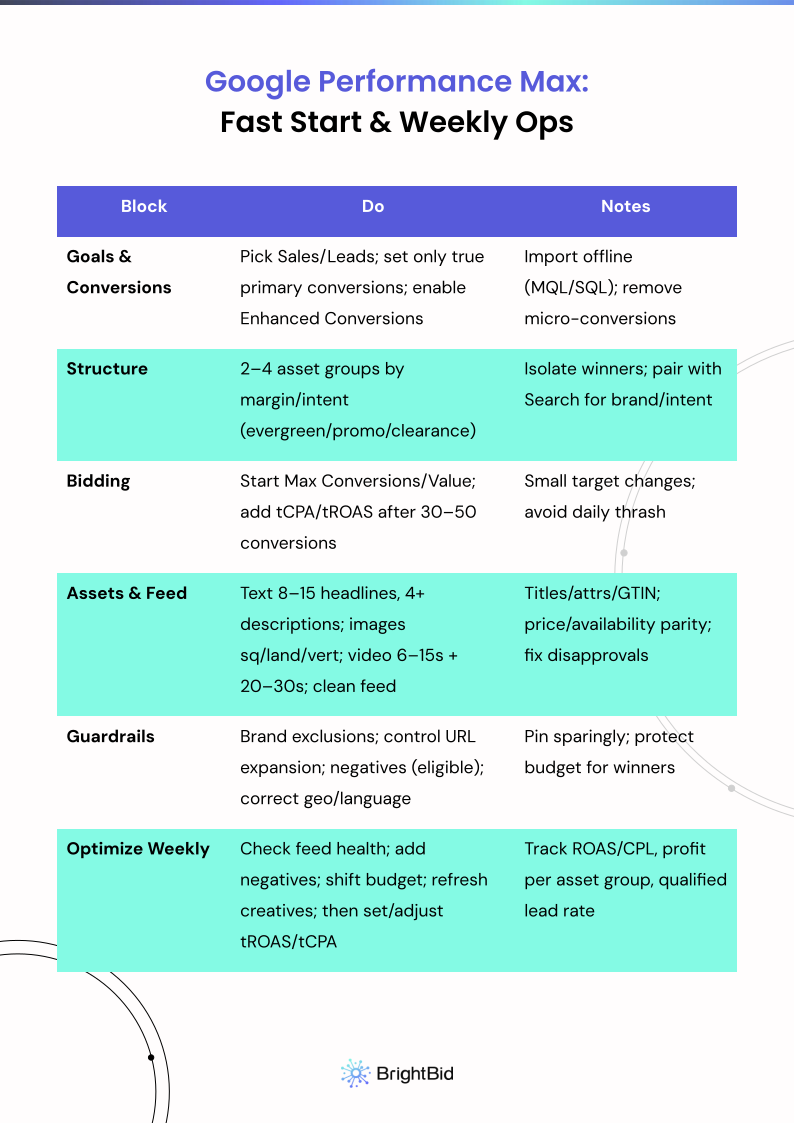
Grab your Performance Max action checklist below 👇
Conclusion — Unleash PMax (Without Losing Control)
PMax works when inputs are clean (feed, conversions, assets) and risks are constrained (exclusions, URL controls, negatives). Segment by margin and intent, give the system enough creative and value signals, then guide it with measured targets. Do that and your Performance Max ads will compound faster than a Search-only plan.
FAQ — Performance Max (with Examples and Customer Proof)
Q1: I’m new—where do I start with Performance Max?
• Read: Performance Max for Beginners: A Step-by-Step Guide
Q2: How do I analyze and optimize an active PMax?
• Read: Performance Max: A Deep Dive into Analysis & Optimization
• Fixes: How to Fix Low Ad Performance on Google Performance Max
Q3: What changed in 2025 that actually matters?
• Start here: How to Kick Off 2025 with New Performance Max Features
• Brand/URL controls: How to Deal with Branded Traffic in Performance Max
Q4: E-commerce specific—How do I optimize shopping performance under PMax?
• Product selection: How to Exclude Products from Performance Max (and Why)
• Shopping optimization: 10 Tips for Optimizing Google Performance Max Shopping Campaigns
Q5: Any customer proof or case studies?
• Overview: Customer Stories
• Deep dive: Stålhästen — How to Market Bikes Online with AI
Q6: Do you have solutions beyond the blog?
• Explore solutions: BrightBid — Google Shopping AI Solution (helpful alongside PMax)
• More articles: BrightBid Blog
 ” />
” />



 ” />
” />


 ” />
” />