


Managing Google Ads accounts is rarely as clean as we wish it were. Budgets drift. CPA spikes. Campaigns fight each other for keywords. And spreadsheets? They only tell part of the story.
BrightBid’s dashboard brings everything together—with clarity, context, and direct actions—so you can stop reacting and start optimizing. Whether you’re a marketing lead, PPC specialist, or agency strategist, here’s why BrightBid’s dashboard is more than just another analytics tool. It’s a keeper.
Table of Contents
A Friendly Nudge That Actually Says Something Useful
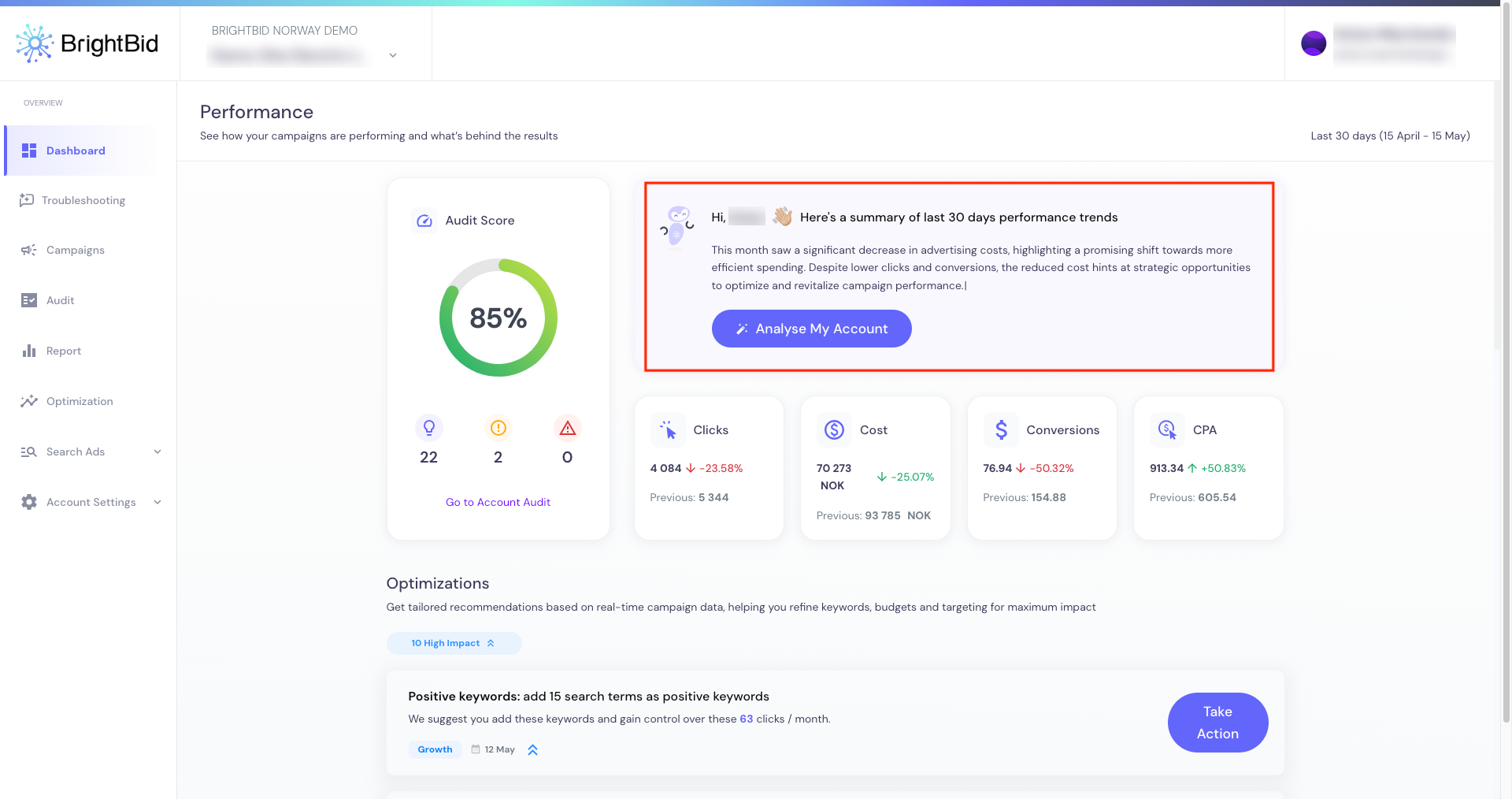
Right at the top, you’re welcomed with a personalized 30-day performance summary. But this isn’t your average data dump—it reads like a short, thoughtful analysis:
“This month saw a significant decrease in advertising costs, highlighting a promising shift towards more efficient spending. Despite lower clicks and conversions, the reduced cost hints at strategic opportunities to optimize and revitalize campaign performance.”
It ends with a big blue button: “Analyse My Account”. That’s not fluff—it’s your shortcut to fixes that matter.
Why it works: You’re not just looking at a dashboard. You’re getting direction—without needing to decode metrics yourself.
Audit your ads for free
Audit Score: More Than a Pretty Circle
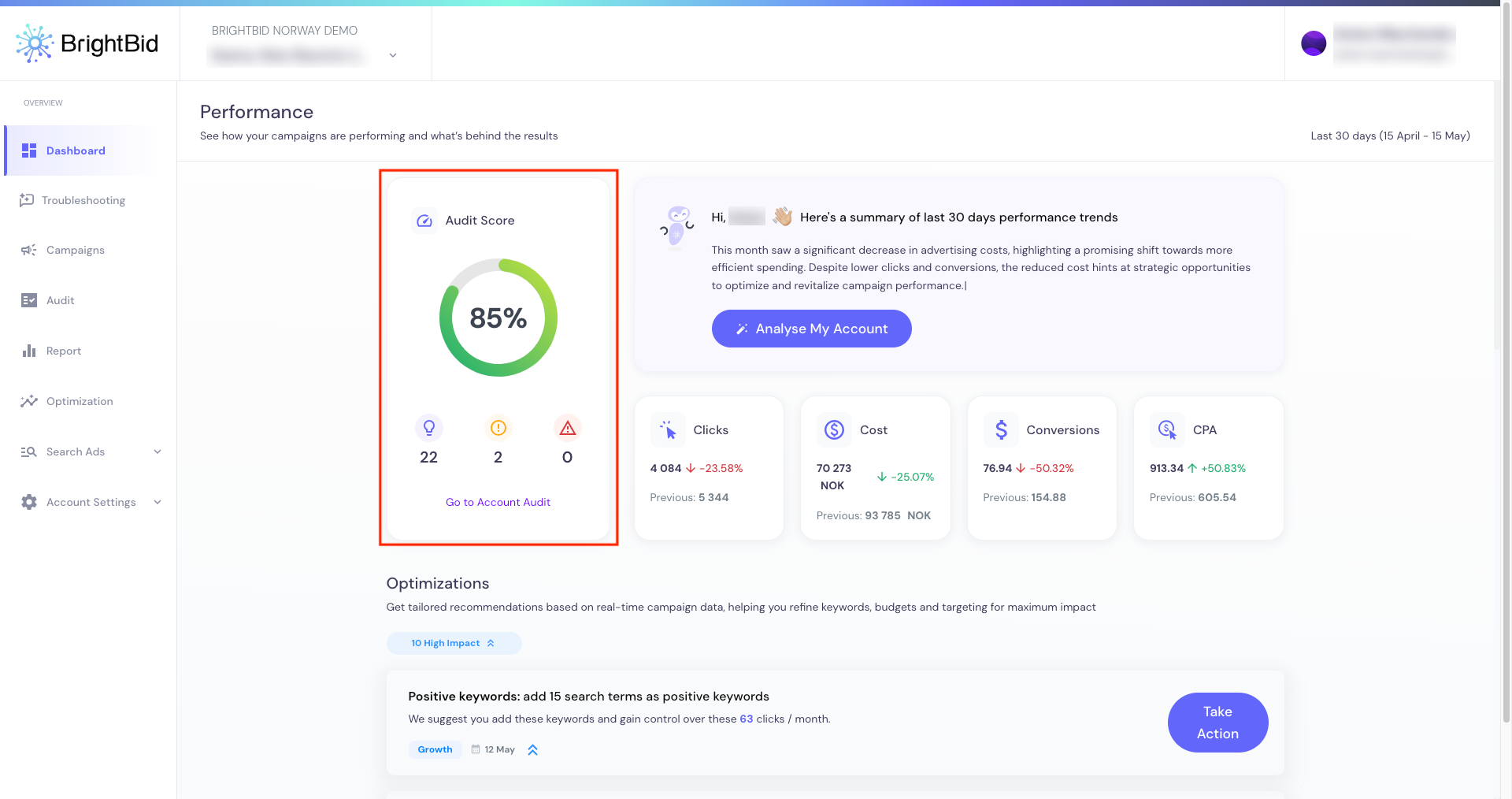
BrightBid shows your account’s Audit Score front and center—like a credit score for your ad performance.
But what sets it apart is the context:
- How many issues were found
- Whether they’re critical or minor
- How many optimizations are already available
Example: “22 issues found, 2 need urgent attention, 0 blockers”
➜ Click “Go to Account Audit” and you’re in troubleshooting mode.
No more guessing where to start or what’s worth your time.
Performance Metrics with Trends That Speak
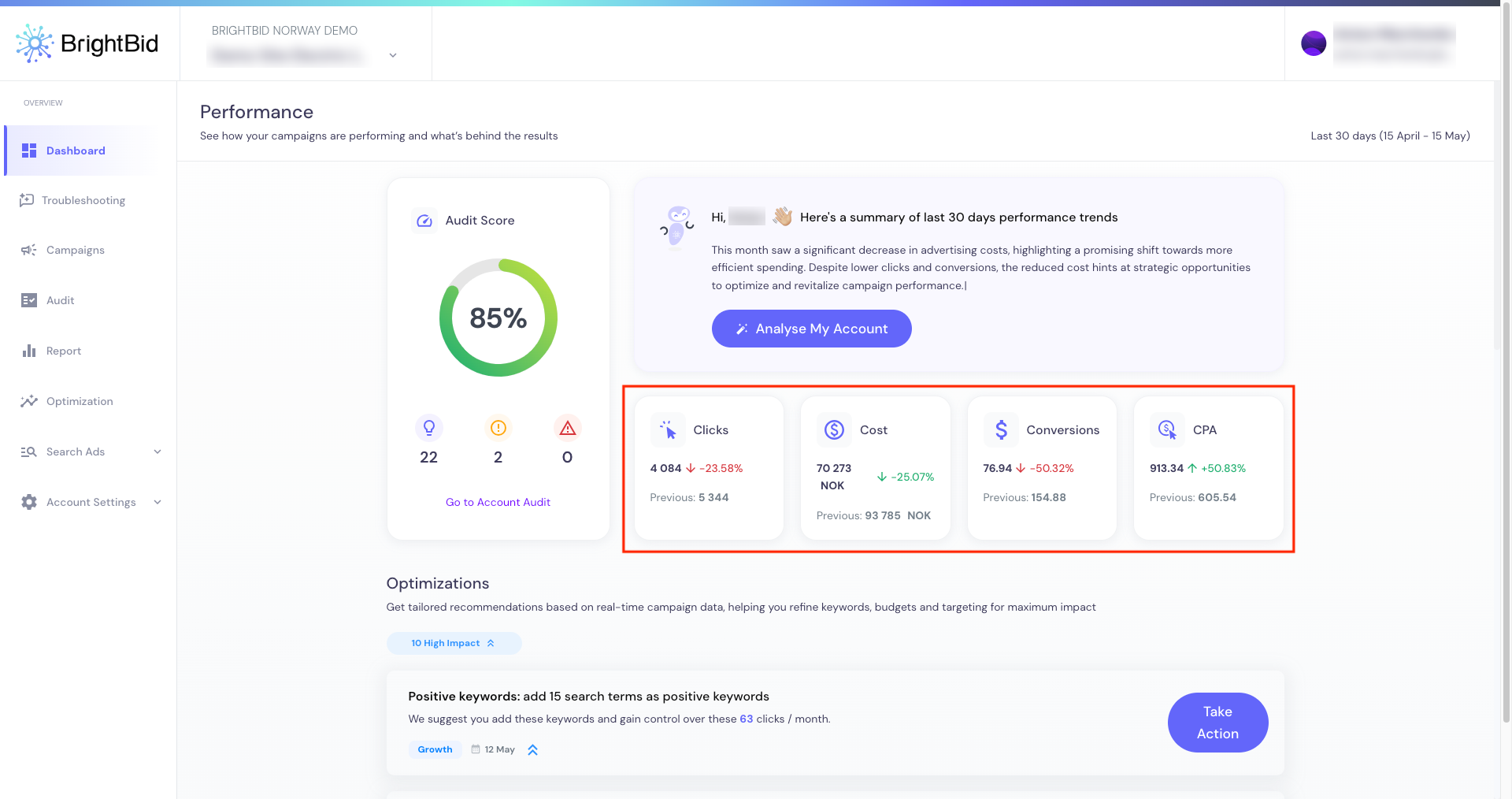
Right below your Audit Score, you’ll find the essentials:
- Clicks
- Cost
- Conversions
- CPA
Each is paired with a percentage change and historical data. For example:
“CPA: 913.34 NOK (↑ +50.83%) from previous 605.54”
“Cost: 70,273 NOK (↓ -25.07%) from 93,785”
You instantly understand where the money is going—and if you’re getting enough back.
Why it matters: You don’t need to export anything to get insight. Trends are visually digestible, and paired with explanations. Fewer spreadsheets. More decision-making.
Optimization Center: Where ROI Gets Real
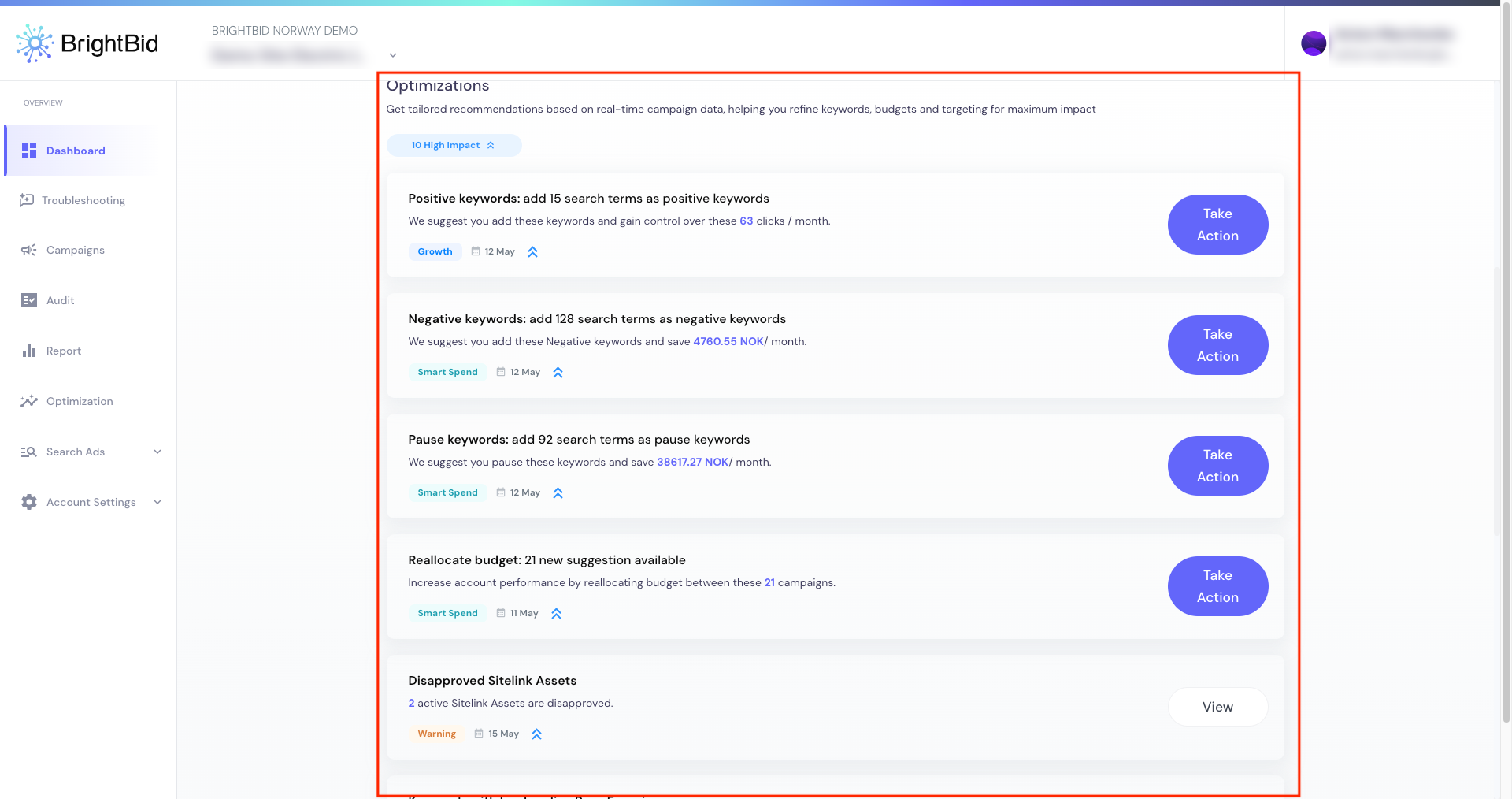
This is where BrightBid shines: the AI-powered optimization hub.
You’ll see actionable items grouped under labels like Smart Spend or Growth, each with a high-impact tag, savings or gain estimate, and a blue “Take Action” button.
Examples include:
- Add 128 negative keywords to save 4,760.55 NOK/month
- Pause 92 search terms to save 38,617.27 NOK/month
- Add 15 positive keywords to gain 63 clicks/month
- Reallocate budget across 21 campaigns
These are not passive suggestions. They’re tactical moves grounded in real data.
Diagnostic Insights That Dig Deeper
BrightBid also flags structural or setup issues across campaigns:
- Keywords with low landing page experience
- Identical keywords across multiple ad groups
- PMax campaigns targeting branded terms
- Search impression share lost due to budget
- Low-performing Search Partners
And again, you don’t just get notified. You see how many keywords, how many impressions, and how much impact it’s making.

🔍 Example:
- “47 keywords with 3,049 impressions have below average Landing Page Experience”
- “Losing 15.64% of impressions due to budget constraints”
No vague warnings. Just clean diagnostics you can act on.
Designed to Help You Act (Not Just Analyze)
Most dashboards give you charts. BrightBid gives you choices.
From your first glance to your last click, the entire experience is built around what you should do next—and gives you the confidence to act.
- Want to clean up keyword bloat? Done.
- Need to reallocate budget in minutes? Click.
- Want to quickly silence underperforming ads? BrightBid will suggest them—and show the ROI of doing so.
Why You’ll Keep Coming Back
BrightBid’s dashboard is not a report. It’s not another analytics tool either.
- It’s your control panel for profitable PPC.
- It’s proactive. Human. Precise.
- It lets you win time, money, and visibility—without needing to become a spreadsheet detective.
And once it helps you avoid wasting thousands in spend, you’ll never want to go back to managing ads the old way.
Audit your ads for free
BrightBid Dashboard FAQ: Everything You Need to Know
Looking to understand how BrightBid’s dashboard fits into your advertising workflow? This quick FAQ answers the most common questions about the platform, performance insights, AI features, and what makes BrightBid a smart long-term solution for your Google Ads strategy.
What is the BrightBid Dashboard?
The BrightBid Dashboard is your real-time command center for managing Google Ads performance. It consolidates metrics like clicks, CPA, cost, and conversions while giving you optimization recommendations, audit scores, and performance trends in one place.
What makes the dashboard different from Google Ads?
While Google Ads shows raw data, BrightBid organizes it into actionable insights. It flags inefficiencies (e.g., wasted spend, low-quality keywords), provides budget reallocation suggestions, and recommends fixes with just one click—powered by AI.
Can I manage multiple accounts in the dashboard?
Yes. The Portfolio View allows you to track performance and audit scores across multiple accounts or clients, making it perfect for agencies and enterprise teams.
What optimizations can I perform from the dashboard?
You can:
- Add or pause keywords
- Apply negative keywords
- Reallocate budgets
- Fix audit issues (like low landing page experience or budget bottlenecks)
All with “Take Action” buttons—no switching tabs.
How does the dashboard know what to optimize?
BrightBid’s AI analyzes over 60+ Google Ads best practices, your performance data, and competitive activity. It then recommends the most impactful changes you can make right now.
Can I track budget performance in the dashboard?
Yes. You’ll see how your actual spend compares to your target, with alerts if you’re exceeding your forecast. It also highlights impression share loss due to low budgets.
Do I need to be a PPC expert to use the dashboard?
Not at all. Whether you’re a specialist or a marketing manager, the dashboard simplifies decision-making with human-readable summaries, audit scores, and pre-ranked fixes.
How do I try the BrightBid Dashboard?
You can:
- Run a free audit by connecting your Google Ads account
- Start a 14-day trial with the Self-Service Hub
- Or book a demo to explore the Full-Service option
Will I get help using the dashboard?
Yes. Self-Service users receive onboarding and platform support. Full-Service clients get monthly strategy calls and hands-on campaign management from BrightBid’s team.
Can I switch between self-serve and managed service?
Yes. The dashboard works seamlessly with both models—and you can scale up or down based on your needs.
What kind of results can I expect?
Customers have reported:
- +300% conversions
- +455% ROAS
- -35% CPC
- +20% conversion rates
Most see results in impressions and CTRs within the first month, with deeper performance gains by month two or three.
Is there a case study of how the dashboard helped someone scale?
Yes. In one example, Taco Bar saw a +400% boost in impressions and +20% conversion rate by using BrightBid’s optimization dashboard.
Do I still control my ad accounts?
Yes. You retain full ownership of your ad accounts at all times. BrightBid only accesses them for optimization purposes with secure admin permissions.
Is the platform GDPR-compliant?
Absolutely. BrightBid adheres to GDPR and processes all customer data securely.


 ” />
” />


 ” />
” />
 ” />
” />