


Table of Contents
Learn how to boost your Google Shopping performance using the right feed strategy — from primary feeds to remarketing and local inventory formats.
Google’s Merchant Center is more than just a database for your products. It’s a dynamic engine for ROI—if you understand how to use the different feed types to your advantage. This guide breaks down each feed type, what it does, and when to use it. Most advertisers stick to basics. Here’s how you go beyond.
Audit your ads for free
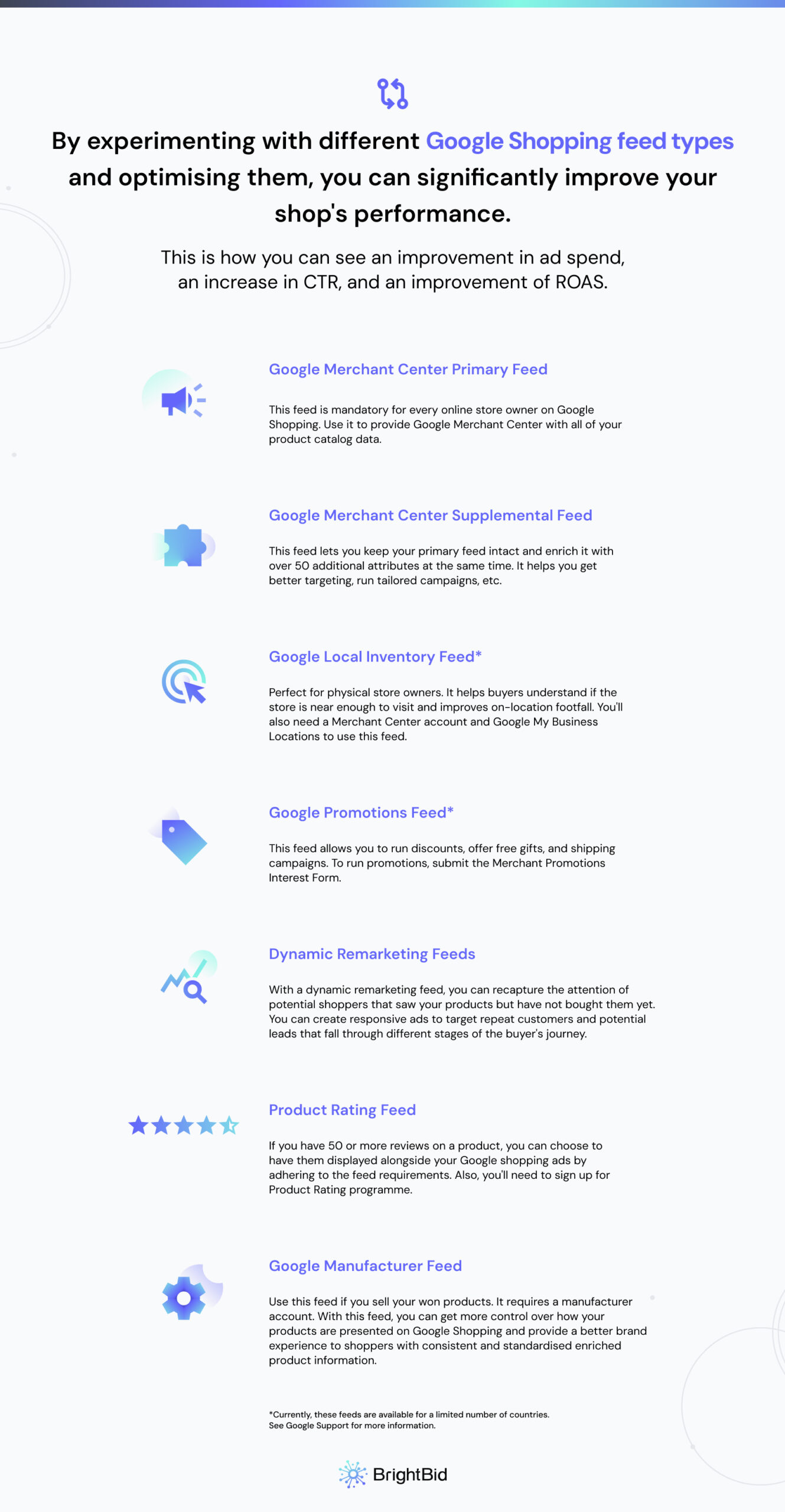
Google Merchant Center Primary Feed (Default Setup)
The primary feed is your core product data source. It provides Google with essential product details, such as:
id,title,description,link,image_linkprice,condition,availability,brandgtinoridentifier_exists- Apparel-specific attributes:
age_group,gender,color,size,material
Pro tip: Always include product_type and google_product_category for better targeting.
But here’s what most guides miss: your primary feed is not a one-size-fits-all tool. Treat it as the clean base layer — everything else extends from here.
Google Supplemental Feed: Extend and Enrich
Supplemental feeds are your flexible friend. They don’t replace your primary feed — they enrich it.
By matching products via id, you can patch missing data or test attribute changes without touching your core feed.
Use cases:
- Add missing GTINs or sale prices
- Override titles or labels for A/B testing
- Exclude products from specific destinations
- Resolve disapprovals quickly
This is your tactical toolkit for agile campaign adjustments.
Google Promotions Feed: Boost Click-Through Rates
Want to stand out in Shopping results? Use the Promotions Feed to show time-sensitive deals directly on your ads.
Supported regions: US, UK, AU, FR, DE, IN
Required fields: promotion_id, offer_type, long_title, promotion_effective_dates, redemption_channel
What works:
- Flat discounts (“10% off” > “up to 10% off”)
- Free shipping codes
- Physical gifts (excludes digital-only products)
Most campaigns ignore this lever. You shouldn’t.
Google Local Inventory Feed: Bridge Online & Offline
Local Inventory Ads (LIAs) allow you to show real-time in-store availability to nearby customers.
Minimum fields: store code, id, quantity, price
Optional: sale_price, availability, sale_price_effective_date
Use this if you have brick-and-mortar stores in:
- US, UK, CA, AU, JP, FR, DE
Choose wisely:
- Use full feeds if your stock rarely changes
- Use incremental feeds if you update stock daily
Want to skip manual work? Google partners with POS providers to automate this.
Google Manufacturer Feed: Control Your Brand Narrative
If you’re a brand or OEM, this feed is your source of truth for how your products appear across Google.
Required: id, gtin, title, description, brand, image_link
Optional (recommended): mpn, product line, release date, videos, MSRP, etc.
Benefits:
- Override inconsistent reseller content
- Provide rich features and branding assets
- Track listing quality and competitor data
Think of this as your brand control panel.
Dynamic Remarketing Feed: Bring Users Back
Already got site traffic? Dynamic remarketing feeds let you retarget cart-abandoners or browsers with personalized ads.
What you need:
- Google remarketing tag installed
- Conversion tracking with transaction values
- At least 100 users & 20 conversions in 45 days
Steps:
- Upload feed to Merchant Center
- Link to Google Ads
- Launch a dynamic remarketing campaign
Your ads adapt to each shopper’s journey—automatically.
Product Ratings Feed: Build Trust, Drive Conversions
Want product stars in your Shopping ads? You’ll need the Product Ratings Feed.
Requirements:
- 50+ reviews total
- Participation in Google’s Product Ratings program
How to connect:
- Use Google Customer Reviews
- Partner with a review aggregator
- Submit your own feed manually
Tip: If you use a trusted aggregator, Google will pull the feed for you.
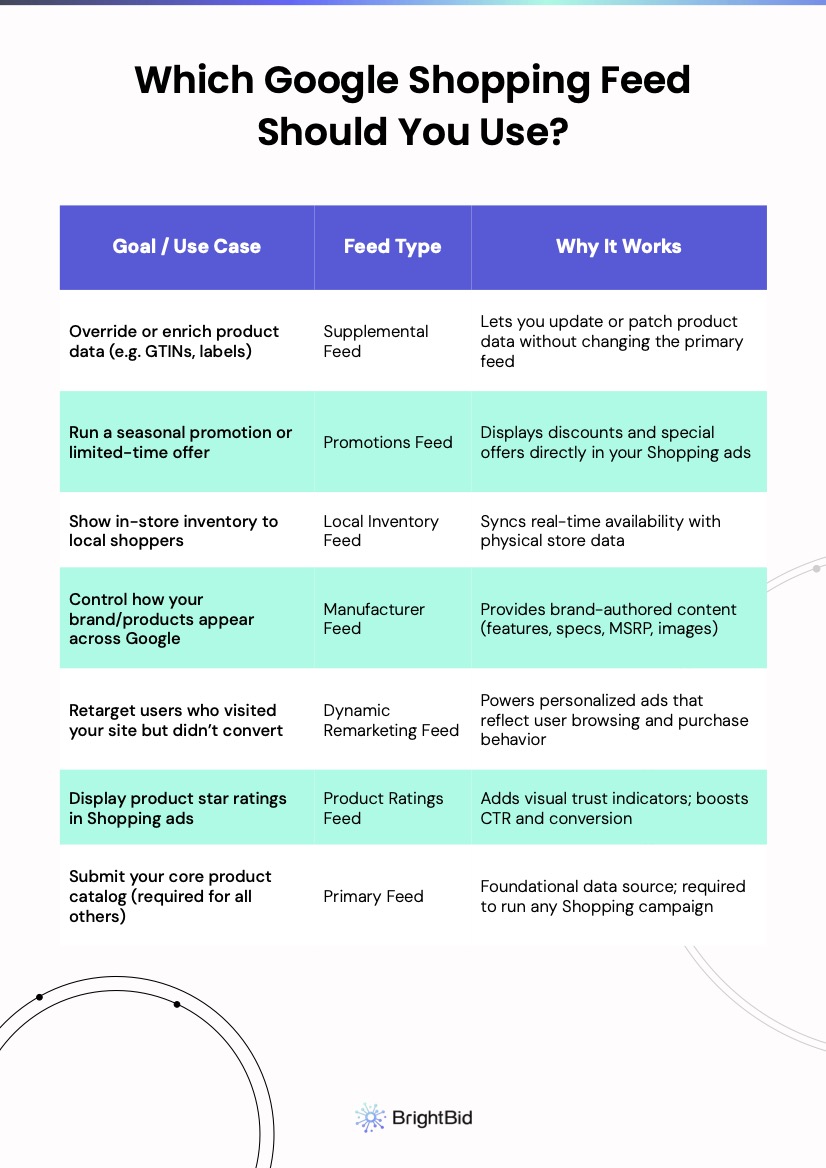
Choosing the Right Feed for Your Objective
Here’s a cheat sheet to help you decide which feed to use:
| Objective | Best Feed |
|---|---|
| Core listings | Primary Feed |
| Attribute overrides | Supplemental Feed |
| Limited-time offers | Promotions Feed |
| Drive in-store visits | Local Inventory Feed |
| Brand storytelling | Manufacturer Feed |
| Retargeting site visitors | Dynamic Remarketing Feed |
| Add product reviews | Product Ratings Feed |
Google Shopping Feed Best Practices
To stay competitive, follow these:
- Reupload feeds every 30 days
- Don’t reuse the same
idacross feeds - Split massive feeds into logical groups
- Use the Content API for scalable sync
- Monitor disapprovals in Merchant Center weekly
Want to see if your feed setup is holding you back?
Run a free ad audit to identify immediate optimization opportunities.
Still wondering which feed combo is best for your business model?
Compare your setup with our advanced Shopping campaign playbook.


 ” />
” />

 ” />
” />
 ” />
” />

